Tenant Growth Pack – Mall Implementation Guide
Tenant Growth Pack – Mall Implementation Guide
Objective
This guide allows the shopping mall to gather all the information the implementation team needs to correctly configure the KSI VISION analytics included in the Tenant Growth pack (store traffic, capture rate, and tenant performance).
The information should be completed together with the Operations / Security / IT teams, who have the mall's up-to-date documentation.
Scalability Recommendations
- Use the same names your company already uses in its internal systems and databases to refer to entrances, corridors, stores, etc.
- Centralize all information through a single internal point of contact.
- Save this guide as a base template for future openings or remodels.
General Mall Information
If you already provided this information for another Mall pack, there is no need to send it again.
| Field | Description | Example / Note |
|---|---|---|
| Mall name | Name the mall exactly as it should appear on the platform. | Punta Carretas Shopping |
| Time zone | Time zone where the mall operates. | GMT-3 Buenos Aires |
| Opening hours | Days and hours of operation. | Mon–Fri: 10–21 h / Sat: 10–23 h / Sun: 10–22 h |
| Annual holidays | Dates when the mall remains closed. Specify whether they repeat every year or have an end date. | January 1, December 25, July 9 — every year |
| Mall floor plan | PDF file showing the main zones (without cameras). | Attach PDF |
Stores
Make a list of the stores you want to configure analytics for. For each one, share the following information:
| Field | Description | Example |
|---|---|---|
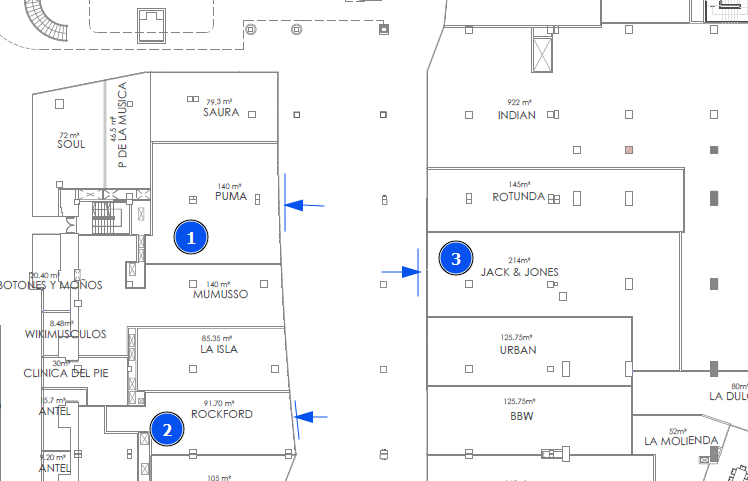
| Identify on the floor plan | Mark the location of each store on the floor plan and flag its entrance(s) — including every floor, if the store spans more than one. | See image below |
| Store name | Commercial name exactly as it will appear on the platform. | ZARA, Crocs |
| Store hours | If all stores share the same hours, state it once. | Mon–Fri: 10–20 h / Sat: 10–21 h / Sun: 12–20 h |
| Tag | Classifies the store by type. | Anchor Stores, Women's Fashion, Sports & Outdoors |
| Stores with exterior access | For stores that can be entered from outside the mall, define whether entries through that access count as: mall access only (perimeter), store access only, or both. | — |
| Specify camera(s) | Camera identifier (and ideally credentials) with a view of each store's access(es). | See conformity note below |
Camera Conformity
KSI VISION will evaluate whether each specified camera is suitable for analytics:
- If the camera is suitable, it will be approved and the analytics configured.
- Otherwise, the mall will be notified of the non-conformity and alternatives will be explored (usually repositioning the camera or installing a new one).
Deliverable – Store Table
Complete an Excel sheet with the following columns for each store:
| Column | Description |
|---|---|
| Store ID on the floor plan | The same ID marked on the plan |
| Store name | As it will appear on the platform |
| Store hours | Operating hours |
| Tag | Store type classification |
| Camera IP | Camera with a view of the store's access |
| Camera user / password | Credentials to access the camera |
Stores Also Measured by the Store Operator
It can happen that the mall measures the access to a store while the store operator also measures the same access from inside — both using KSI VISION (for example, a retail chain with its own Retail plan).
In these cases, the platform recognizes that both counting lines belong to the same store and resolves the overlap automatically:
- The counting line whose implementation audit achieved the higher measured precision is used as the primary count for the store.
- The other counting line is kept as a secondary count.
This requires no action from the mall or the store operator: there is no double counting, and the store's traffic is always based on the most precise available measurement.
Users and Access
Available roles:
| Role | Description |
|---|---|
| Viewer | View dashboards and download information |
| Tenant | View analytics only for their own store(s) |
| Admin | Viewer + configuration + user creation |
Provide the email address and role for each person who needs a user account:
| Name | Role | |
|---|---|---|
Tip: the Tenant role lets each store operator see the analytics of their own store(s) only — useful for sharing traffic and performance data with your tenants.
Sending the Information
Once you complete the tables and prepare the required files (floor plans, store lists, camera credentials), send everything to the setup team:
Make sure to include:
- The mall floor plan with store and entrance identification.
- The completed store table (Excel).
- The user list with roles.
- A contact person in case the team needs further validation.
Once received, the team will review the information and contact you if any adjustments or confirmations are needed.